PRM · Deal Registration
Partner deal registration without a portal login.
Partner deal registration is how a partner claims a deal they sourced, so you can protect it, track it, and pay on it. In Suger PRM, partners submit through a public form or a branded email alias — no login — and the deal auto-creates as an opportunity in Salesforce or HubSpot.
What is partner deal registration?
Partner deal registration is the process a partner uses to formally claim an opportunity they sourced, so the vendor can protect that deal from channel conflict and attribute the revenue to the right partner. A registration in Suger PRM is a single record carrying the customer, the partner, the deal value, and its approval state — and it stays in step with your CRM from the moment it is submitted until the deal closes.
No portal login required
Partners register through a public form on your site or by emailing a branded alias. Nothing to install, no password to reset, no adoption problem.
Under two clicks to submit
The shorter the form, the more deals you see. Registration takes under two clicks, and the partner gets a confirmation that comes from your brand.
Auto-created in your CRM
Each registration becomes an opportunity in Salesforce or HubSpot automatically, so partner-sourced pipeline sits next to direct pipeline.
Register a deal
Register the deal when a customer buys through a partner
Create the registration the moment you know a partner is bringing the deal. Pick the partner, attach the customer and deal details, and the record enters the approval queue with everything a reviewer needs — whether the partner submitted it or your own team registered it outbound.
What a registration carries
- Partner, partner type, and the customer buying through them
- Deal value and expected close, on one record
- Approval routing by partner tier, geography, or partner type
- Outbound registration from your CRM, with no partner login
Illustrative sample data — not customer results.
CRM sync
Every registration lands in your CRM
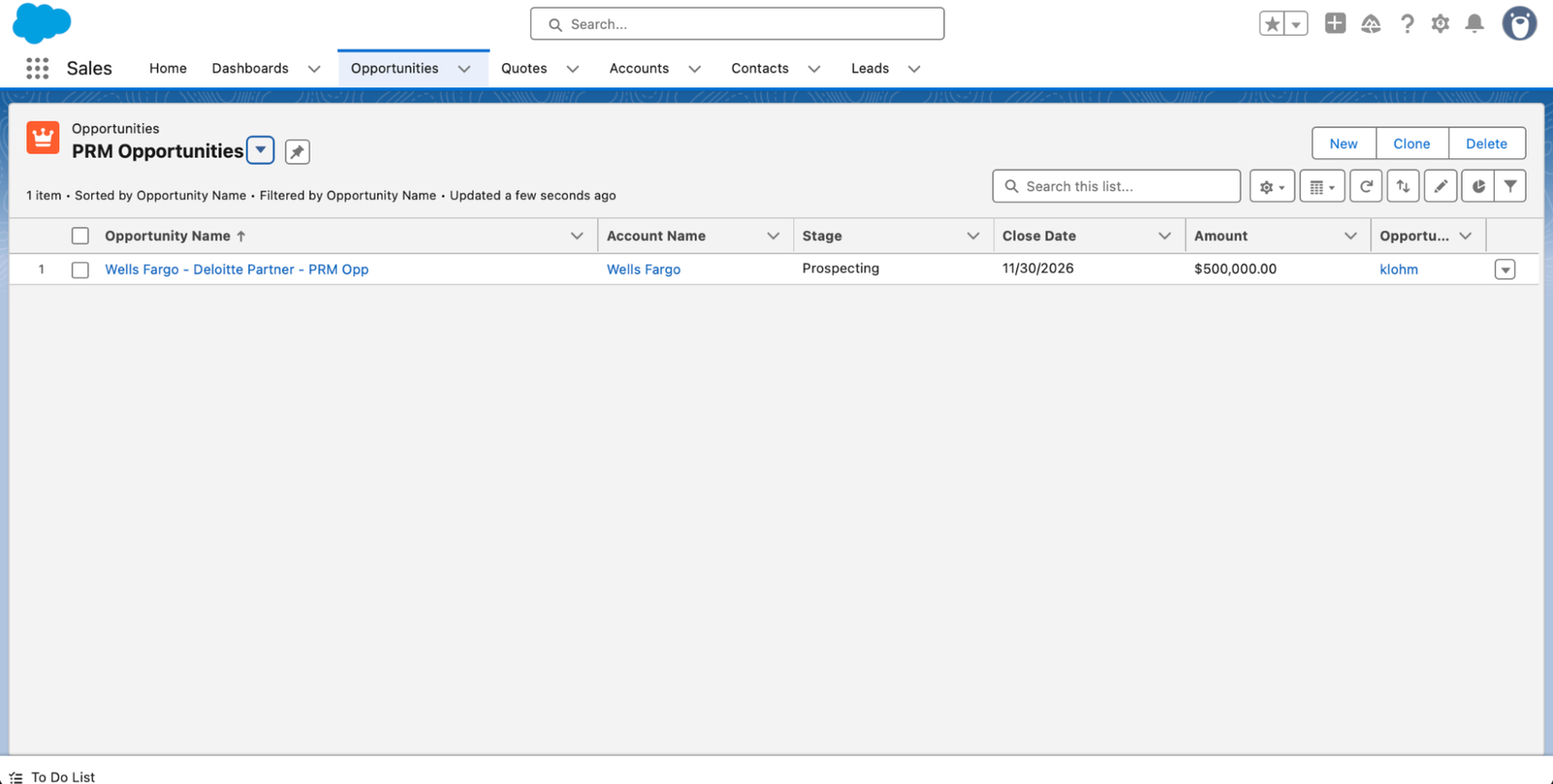
A registered deal is only useful if your sellers can see it. Suger PRM auto-creates the opportunity in Salesforce or HubSpot and keeps the record current in both directions, so partner-sourced pipeline shows up in the same forecast as direct pipeline instead of in a separate spreadsheet.
- Opportunities created automatically from approved registrations
- Bi-directional sync with Salesforce and HubSpot
- Partner attribution visible on the opportunity record
Track and respond
Watch every registered deal in Partner Co-Sells
Registered deals collect in Partner Co-Sells, the workspace where your team monitors progress and responds to the partner who submitted them. One queue shows what is waiting on review, what has been approved, and what has moved on — so nothing sits unanswered in an alliances inbox.
- One queue for every registration your partners submit
- Respond to the partner without leaving Suger
- Status changes stay in step with the CRM opportunity
Illustrative sample data — not customer results.
The partner side
What a partner does to register a deal
A partner submits the deal and then follows it from the same place. Four steps cover the whole path, and only the first one asks anything of them.
Submit
The partner fills in the public registration form, sends the branded email alias, or submits from inside your portal.
Get confirmation
Suger acknowledges the submission under your brand, so the partner knows the deal was received.
Wait on approval
The registration routes to the right reviewer by partner tier, geography, or partner type.
Track to close
The partner follows the deal from their own submission view as your team updates it.
Deal registration documentation
Three docs cover the full registration path, from the vendor-side record through the partner-side submission.
Register a deal
Create a deal registration when a customer buys through a partner.
Track and respond to deals
Monitor registration progress and reply to partners in Partner Co-Sells.
Submit a deal registration (partner)
The partner-side view for submitting a deal and tracking its status.
Where deal registration fits in Suger PRM
Registration is the front door. Commissions pay out on what comes through it, and the partner portal is where partners live the rest of the time.
Suger PRM overview
Deal registration, co-sell, commissions, and enablement in one partner platform.
Partner commission management
Turn an approved registration into an accurate payout the moment the deal closes.
White-label partner portal
Give partners a branded home for registrations, files, and their partnership profile.
Partner deal registration questions
What is partner deal registration? +
Partner deal registration is the process a partner uses to formally claim an opportunity they sourced, so the vendor can protect it from channel conflict and attribute the revenue correctly. The registration records the customer, the partner, and the deal value.
Can partners register a deal without logging in? +
Yes. With Suger PRM, partners submit through a public form on your site or by sending a branded email alias, with no portal login required. Registration takes under two clicks and the partner gets a confirmation from your brand.
Where does a registered deal end up? +
In your CRM. Every registration auto-creates as an opportunity in Salesforce or HubSpot, and the sync is bi-directional, so partner-sourced pipeline shows up in the same forecast your sellers already work.
How are deal registrations approved? +
Approval routing runs by partner tier, geography, or partner type, so each submission reaches the reviewer who owns it. Your team responds inside Partner Co-Sells, and the partner sees the outcome in their own submission view.
Can partners see the status of a deal they registered? +
Yes. Partners track their submissions from the partner-side view, so they can see which registrations were approved and which are still in review without emailing your alliances team for an update.
Do we need a cloud marketplace to register partner deals? +
No. Suger PRM registers deals for any partner type, including VARs, GSIs, resellers, and ISV partners whose deals never touch a marketplace. If you also co-sell on AWS, Azure, or Google Cloud, both motions run in the same workspace.
Capture every partner deal with Suger PRM
See how deal registration, approvals, and CRM sync run end to end in a single partner workspace.